Posts

SQL Server useful system stored procedures

sp_helprotect [object_name] Returns a report with information about user permissions for an object, or statement permissions, in the current database. sp_helptext [view_name] Prints the text of a rule, a default, or an unencrypted stored procedure, user-defined function, trigger, computed column, or view. Full list of System Stored Procedures

How to set Microsoft IIS to 32bit on 64bit server

go to %systemdrive%\Inetpub\AdminScripts run cscript.exe adsutil.vbs set W3SVC/AppPools/Enable32BitAppOnWin64 1 go to  C:\WINDOWS\Microsoft.NET\Framework\v2.0.50727 run IIS installer aspnet_regiis.exe -i Allow 'ASP.NET v2.0.50727 (32-bit)' under Internet Information Services/Web Service Extensions Disable 'ASP.NET v2.0' if exists (this is 64bit version) Restart IIS

Model-View-ViewModel in WPF

90 Minutes Video by Jason Dolinger DataModel-View-ViewModel pattern series by Dan Crevier

Active Directory Lookup Window

%windir%\system32\rundll32.exe dsquery.dll,OpenQueryWindow

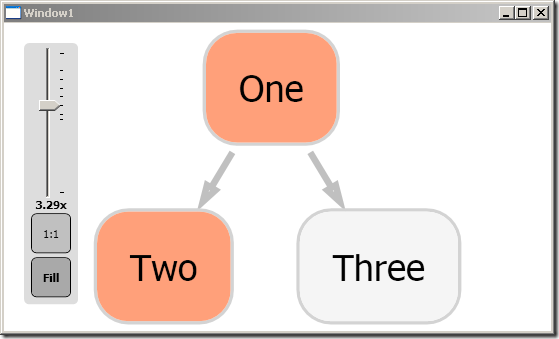
Graph# – WPF Graph Layout Framework

Image
Download Graph# Add References to GraphSharp.dll GraphSharp.Controls.dll QuickGraph.dll WPFExtensions.dll This sample shows you how to Visualize Data on the graph Update Graph using notifications Add menu items to graph object Add events to graph object Zoom in/out < Window x : Class = "Samples.TestGraph.Window1" xmlns = "http://schemas.microsoft.com/winfx/2006/xaml/presentation" xmlns : x = "http://schemas.microsoft.com/winfx/2006/xaml" xmlns : graphsharp = "clr-namespace:GraphSharp.Controls;assembly=GraphSharp.Controls" xmlns : zoom = "clr-namespace:WPFExtensions.Controls;assembly=WPFExtensions" xmlns : local = "clr-namespace:Samples.TestGraph" Title = "Window1" Height = "335" Width = "592" > < Grid > < Grid.Resources > < local : ActiveConverter x : K...

Free WPF Docking Library (like in Visual Studio)

Image
AvalonDock http://avalondock.codeplex.com/ Getting Started Tutorial

Python Reference

# import libraries import sys , os ,shutil,glob, string , re ,datetime #===================================== # IO Samples #===================================== # read file line by line f= open ('text.txt','r') for line in f: print string . split (line, '\n')[0] #remove linebreak # read file all at once f= open ('text.txt','r') text = f. read () print (text) #current directory print os .getcwd() #list files/folders in current directory for file in os .listdir( os .getcwd()): print file # print directory structure def printDir( path ,indent): for root, dirs, files in os .walk( path ): for name in dirs: print indent+ name printDir( os . path . join (root, name ),indent+" ") for name in files: print indent+ name printDir( os .getcwd()) #create dir os .mkdir(" Test ") #delete dir os .remove(" Test ") #execute command os .system(" mkdir x ") #exe...